
Cheque Printing Software In Excel
Cheque Printing Software in Excel
Cheque Printing in Excel
Transform your cheque printing experience with our fully automated Excel utility. The XLTOOL Bank Cheque Printing Excel Format Utility is your complete solution for seamless, automated, and error-free bulk cheque printing. Forget about the hassles of manual cheque writing and embrace this software that manages your bank-issued cheques effortlessly. Developed entirely in Excel format, this tool is extremely user-friendly, letting you operate it quickly without any steep learning curve. It’s perfect for small businesses, individual professionals, and even larger organizations looking to streamline financial operations. Enjoy reliable, organized cheque records and free yourself from repetitive, error-prone tasks. This utility doesn’t just print — it simplifies and organizes your cheque handling. With this tool, you’ll reduce mistakes, save time, and maintain professional cheque presentations. Download it free and experience how your day-to-day banking documentation becomes smoother, faster, and more reliable, all while using a format you’re already comfortable with.
Cheque Printing Software in Excel format free download:
- User-friendly Excel interface makes it simple to input and manage cheque printing data directly in your spreadsheets, ensuring you stay within a familiar system. You can customize templates to match your needs and navigate effortlessly, whether printing one cheque or handling multiple payees.
- The software is compatible with all major Microsoft Excel versions, which means there’s no need for costly upgrades or retraining staff. Use the same trusted application with enhanced capabilities for cheque printing. It also maintains formatting consistency across different Excel installations, reducing surprises when printing. This integration not only saves time but also ensures that your accounting staff or individual users can start using the software immediately without adapting to an entirely new platform. Enjoy dependable operation, lower costs, and quick deployment — all crucial benefits for busy professionals looking for a simple but powerful tool.
Bulk cheque printing software:
- Automatically print single or multiple cheques from any bank with guaranteed accuracy. Handle payroll, supplier payments, and loan disbursements without manually writing each cheque, saving countless hours.
- Sequential cheque printing means you can process cheques in any order that suits your workflow. This flexibility is critical for businesses with complex vendor lists or payment schedules that require grouping or prioritizing certain payments over others.
- Bulk printing also reduces wear on printers and cuts down errors since details are pulled directly from your Excel records. Each cheque’s number and details are systematically tracked, helping you maintain precise records and meet audit requirements easily. This improves financial transparency and control across all levels of your business.
- For finance teams, this process drastically reduces administrative burden and allows more focus on strategic tasks like cash flow management and forecasting. Whether you’re printing 5 cheques or 500, the software scales effortlessly to your needs, ensuring the same speed and reliability throughout.

Custom cheque printing:
- Easily modify the printing font, size, and style to match your brand guidelines or personal preferences. This means your cheques will not only be functional but also reflect a professional, consistent appearance aligned with your business identity.
- Make simple layout adjustments and move fields as per your printer setup, ensuring everything aligns perfectly. No more frustrating test prints wasting time and paper — this adaptability ensures each cheque looks right the first time.
- Customization is especially valuable for organizations with multiple bank accounts or distinct cheque formats. You can set up individual layouts for different banks or branches, and save these templates for quick reuse. This streamlined customization guarantees that whether you print one cheque or hundreds across various formats, each print job maintains your chosen standard.
Cheque book management:
- This software serves as a powerful cheque management database, tracking every issued cheque automatically. It eliminates manual logs and spreadsheets, centralizing your records for quick reference and compliance.
- Add or delete database fields effortlessly as your reporting needs evolve, ensuring your records stay relevant. Whether you’re monitoring by vendor, amount, or cheque date, the system adapts to your business requirements.
- Search and retrieve past transactions instantly, simplifying financial reviews and audits. This dynamic approach not only keeps your records organized but also supports long-term data retention policies, making sure nothing is lost over years of operation.
- With better data visibility, it’s easier to catch duplicate payments, track pending transactions, and stay on top of your cash flow.
Print cheques in different language:
- Multilingual cheque printing lets you serve customers, vendors, and partners across diverse regions by printing cheques in multiple languages. This is crucial for businesses operating in multicultural markets or internationally.
- By supporting various scripts, the software helps avoid misunderstandings, ensuring recipients can read and verify their cheques without confusion. It also strengthens brand trust in global transactions where local language documentation adds professionalism and comfort.
- Additionally, multilingual capability is helpful for companies managing payroll across states or countries, accommodating language preferences of employees and local banks alike. This ensures smooth banking interactions and fosters goodwill with stakeholders worldwide.
Easy review and search:
- Review issued cheques anytime using criteria such as date, payee, cheque book account, or specific amounts, giving you full transparency over your payments.
- Find specific cheques quickly with tailored search parameters, drastically cutting down the time compared to manual record checks. This feature is particularly important during audits or when reconciling accounts at month or year-end.
- Robust search and review tools mean you can answer vendor inquiries or internal questions with confidence, improving financial communication across your organization. It also allows finance teams to spot trends, such as frequent payments to certain suppliers, helping with budget planning.
Check preview and security:
- Preview each cheque before printing to ensure all details are correct, avoiding costly mistakes or embarrassing errors. This is your last line of defense before finalizing a financial document.
- Security features protect your cheque printing environment from unauthorized access, maintaining the integrity of your financial processes. Strong controls keep sensitive bank details and payee data safe, critical for compliance with privacy laws and internal company policies.
- Combined, these features give peace of mind that your cheque operations remain accurate, secure, and professionally managed.

Flexible and cost-effective:
- This solution provides unmatched flexibility at a fraction of traditional cheque printing costs. It removes the need for dedicated, expensive cheque writing hardware or outsourcing these services.
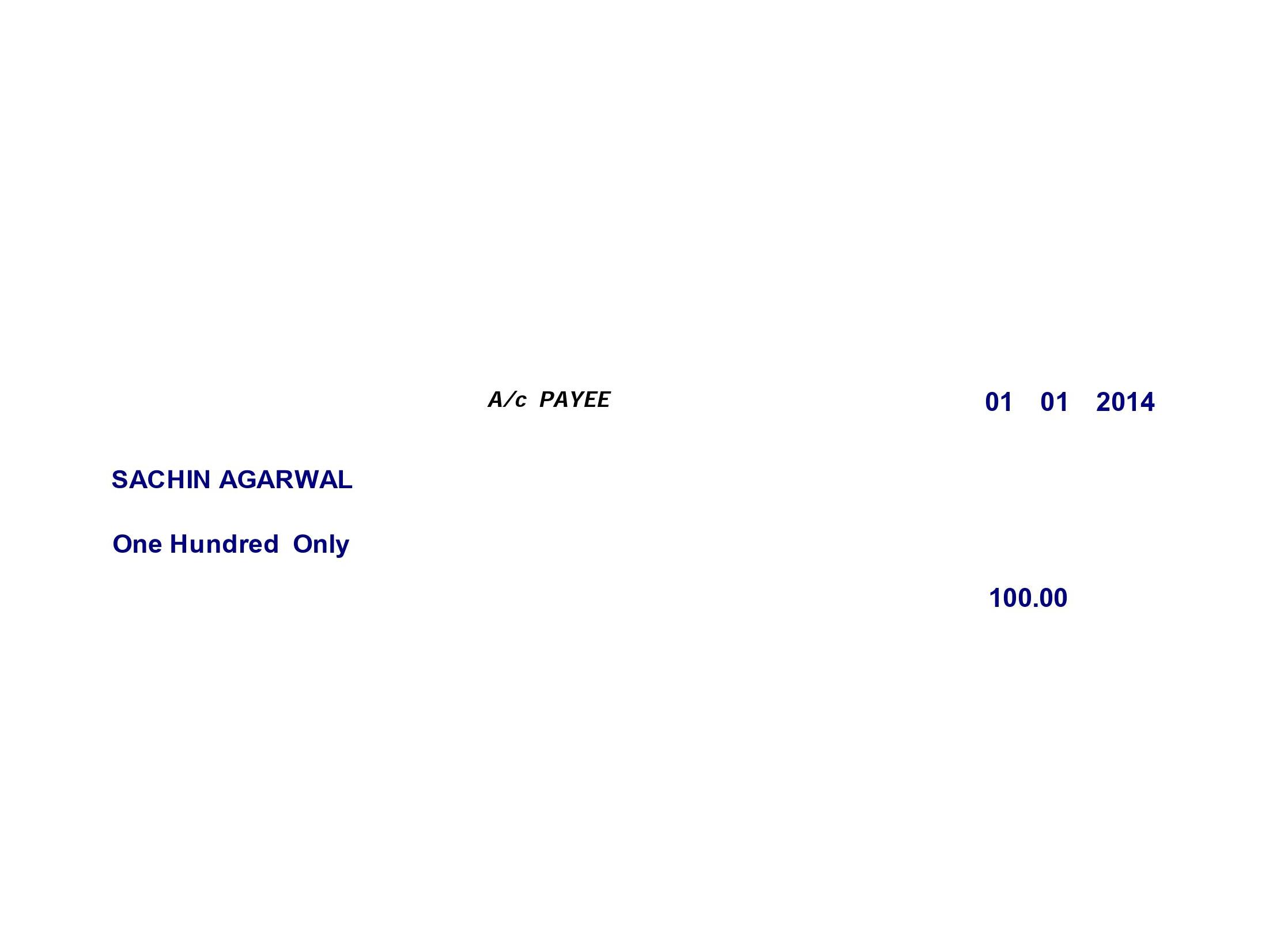
- Print payee name, date, amount in numbers and words, “A/c payee only,” and even signature lines — all customized to your requirements. This complete control ensures professional cheques every time, helping you build trust with suppliers and clients alike.
- It’s ideal for startups, SMEs, or large enterprises wanting reliable cheque printing without ballooning costs.
User-friendly operation:
- The familiar Excel format means even non-technical users can easily manage cheque printing. Simply enter data into a central spreadsheet and let the software handle the rest.
- Centralized payee data entry avoids duplicate work, keeping your financial records clean and consistent across every department.
- Print dozens or hundreds of cheques in minutes with a single action. Pause or resume printing as your needs change, providing complete operational flexibility.
- Perfect for individuals, small businesses, and corporations managing multi-account or multi-branch operations, ensuring consistency across the board.
It supports all bank cheques like Andhra Bank, Bank of India, Bank of Maharashtra, Canara Bank, Central Bank of India, Corporation Bank, Dena Bank, Indian Bank, Indian Overseas Bank, IDBI, Oriental Bank of Commerce, Punjab National Bank, Punjab & Sind Bank, Syndicate Bank, UCO Bank, Bank of Baroda, Union Bank of India, United Bank of India, Vijaya Bank, Allahabad Bank, Axis Bank, Federal Bank, HDFC Bank, ICICI Bank, IndusInd Bank, Karnataka Bank, Kotak Mahindra Bank, RBL Bank, National Bank, Tamilnadu Mercantile Bank, South Indian Bank, YES Bank, IDFC, Universe Bank, HSBC, State Bank of India, and many more.
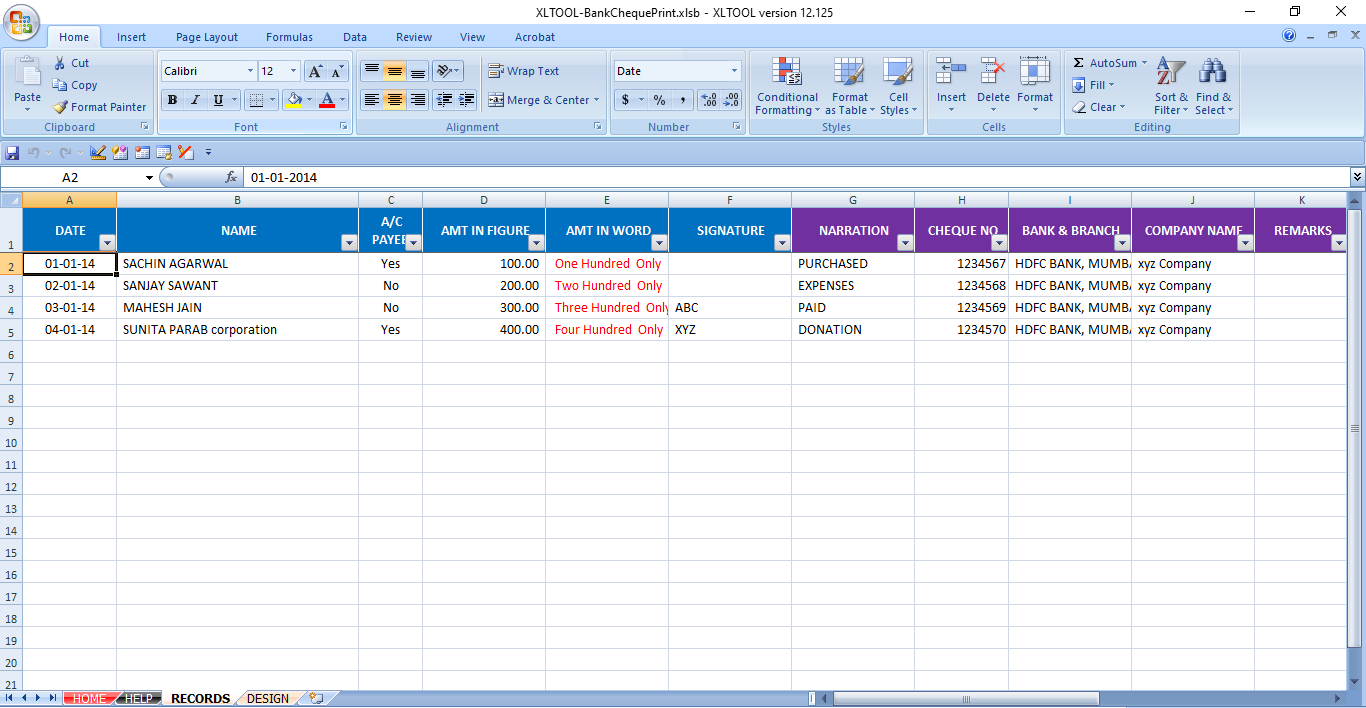
Cheque print software screen shots:

📣 Related Posts:
-
 How to Add License Key System in Excel Protection VBA (Secure File Protection)?
-
 How to Remove Open Password from Excel Files Safely?
-
 How to Generate Form 15CA and 15CB Online
-
 How To Export all Tally Data To Excel?
-
 How to Export Tally data in Excel Format?
-
 How to Export all Transactions from Tally To Excel?
-
 Send bulk WhatsApp images from Excel
-
 How to Prevent Users from Accessing VBA Code in Excel File?
-
 One Click Protect All Sheets in Excel for Safe Sharing
-
 Free cheque printing software in Excel